Showing posts with label Softwares/ Tools. Show all posts

Monday, December 29, 2014

NX Unigraphics: Tutorials, Guide

Sketching.
http://www.mediafire.com/file/gaww9efzlktc58o/Unigraphics NX8 – Sketching.pdf
Modeling.
http://www.mediafire.com/file/higcwratv2co7cy/Unigraphics NX8 – Modeling.pdf
Associactive Copy.
http://www.mediafire.com/file/r9xmk00i7isk364/Unigraphics NX8 – Associative Copy.pdf
Combine Bodies
http://www.mediafire.com/file/omx1yodw11xytq5/Unigraphics NX8 – Combine bodies.pdf
Design Feature
http://www.mediafire.com/file/pynf7vsonh7uma7/Unigraphics NX8 – Design Feature.rar
Detail Feature
http://www.mediafire.com/file/zygkiv59uov9jrj/Unigraphics NX8 – Detail Feature.pdf
Mesh Surface
http://www.mediafire.com/file/wmzjcu784od3m75/Unigraphics NX8 – Mesh Surface.pdf
Offset, Scale
http://www.mediafire.com/file/kx31rjzqu3b3uj9/Unigraphics NX8 – Offset, Scale.pdf
Surface
http://www.mediafire.com/file/5m9d6j66e7f5yg9/Unigraphics NX8 – Surface.pdf
Sweep
http://www.mediafire.com/file/zkos6sx85jgs4p7/Unigraphics NX8 – Sweep.pdf
Trim Bodies
http://www.mediafire.com/file/5dk1f3vn89vx13y/Unigraphics NX8 – Trim bodies.pdf

Tuesday, December 2, 2014

The Yt project in Python: olumetric Data Analysis, Astrophysical simulation

Yt is an additional python package aiming for Volumetric Data Analysis, An volumetric analysis and visualization toolkit for Astrophysical simulations, handling multi-resolution data from astrophysical simulations, radio telescopes, and a burgeoning interdisciplinary community, etc.

Link: http://yt-project.org/

Wednesday, November 12, 2014

Free Fire Dynamics Simulator (FDS) and Smokeview

Fire Dynamics Simulator (FDS) is a large-eddy simulation (LES) code for low-speed flows, with an emphasis on smoke and heat transport from fires.
Fire Dynamics Simulator (FDS) is a computational fluid dynamics (CFD) model of fire-driven fluid flow. The software solves numerically a form of the Navier-Stokes equations appropriate for low-speed, thermally-driven flow, with an emphasis on smoke and heat transport from fires.

Smokeview (SMV) is a visualization program used to display the output of FDS and CFAST simulations.

FDS+Evac is the evacuation simulation module for Fire Dynamics Simulator (FDS). The software is used to simulate the movement of people in evacuation situations. The evacuation simulations can be fully coupled with the fire simulations.

These tools are open source and freely available.

Source: https://code.google.com/p/fds-smv/


Tuesday, November 11, 2014

Django

Django is a free and open source web application framework, written in Python, which follows the model–view–controller architectural pattern. It is maintained by the Django Software Foundation (DSF), an independent organization established as a non-profit.

Django's primary goal is to ease the creation of complex, database-driven websites. Django emphasizes reusability and "pluggability" of components, rapid development, and the principle of don't repeat yourself. Python is used throughout, even for settings, files, and data models. Django also provides an optional administrative create, read, update and delete interface that is generated dynamically through introspection and configured via admin models.

Source: www.djangoproject.com

Saturday, November 8, 2014

SU2 Compressible Flow Solver - open source

Stanford University Unstructured (SU2)
Computational analysis tools have revolutionized the way we design aerospace systems, but most established codes are proprietary, unavailable, or prohibitively expensive for many users. The SU2 team is changing this, making computational analysis and design freely available as open-source software and involving everyone in its creation and development. 

Source: http://su2.stanford.edu/

Thursday, November 6, 2014

iFEM, Finite Element, Matlab

iFEM is a MATLAB software package containing robust, efficient, and easy-following codes for the main building blocks of adaptive finite element methods on unstructured simplicial grids in both two and three dimensions. Besides the simplicity and readability, sparse matrixlization, an innovative programming style for MATLAB, is introduced to improve the efficiency. In this novel coding style, the sparse matrix and its operations are used extensively in the data structure and algorithms.

Source: http://www.math.uci.edu/~chenlong/programming.html

Wednesday, October 29, 2014

GrabCAD Workbench: manage and share CAD files

GrabCAD Workbench

The fast, easy way to manage and share CAD files without PDM cost and hassle.
Workbench allows teams on any CAD system to work smoothly together by syncing local CAD files to cloud projects, tracking versions and locking files to prevent conflicts.

Source: http://grabcad.com/

Tuesday, October 28, 2014

OpenMDAO - Multidisciplinary Design Analysis and Optimization

OpenMDAO is an open-source (why?) Multidisciplinary Design Analysis and Optimization (MDAO) framework, written in Python. You can use it to develop an integrated analysis and design environment for your engineering challenges.

In layman’s terms: OpenMDAO is a piece of software that links other pieces of software together. It allows you to combine analysis tools (or design codes) from multiple disciplines, at multiple levels of fidelity, and to manage the interaction between them. OpenMDAO is specifically designed to manage the dataflow (the actual data) and the workflow (what code is run when) in conjunction with optimization algorithms and other advanced solution techniques. OpenMDAO also has extensive optimization capabilities built right in.

Link: http://openmdao.org/

Monday, October 20, 2014

Install PyDev for Eclipse in Linux

Install PyDev for Eclipse in Linux

Eclipse: Help > Install New Software
  • Work with: PyDev - http://pydev.org/updates
  • Name> Select PyDev
  • Next
  • Select "PyDev for Eclipse"
  • Next
  • I accept terms of the license agreement
  • Finish
Error: ""Installing Software" has encountered a problem. 
An error occurred while collecting items to be installed"

How, Troubleshoot:
- Ubuntu 12.04
- Eclipse Version: 3.7.2

Eclipse: Help > Install New Software
  • Work with: PyDev - http://pydev.org/updates
  • Deselect "Show only the latest versions of available software"
  • Name> Put arrow down PyDev
  • Select "PyDev for Eclipse, 2.8.2"
  • Next
  • Select "PyDev for Eclipse"
  • Next
  • I accept terms of the license agreement
  • Finish


Friday, October 17, 2014

matplotlib: free plotting tool in Linux, (python code) similar Matlab

matplotlib

matplotlib is a pure Python 2D plotting library designed to bring publication quality plotting to Python with a syntax familiar to MATLAB users. All of the plotting commands in the pylab interface can be accessed either via a functional interface familiar to MATLAB users or an object oriented interface familiar to Python users.
The library uses numpy for handling large data sets and supports a variety of output backends including GTK GTKAgg, GTKCairo, FltkAgg, QtAgg, TkAgg and WXAgg.

 Features include:
  • Generate:
    • Plots
    • Histograms
    • Power spectra
    • Bar charts
    • Errorcharts
    • Scatterplots and more
  • Based on Python, a full-featured modern object-oriented programming language suitable for large-scale software development
  • Suitable for fast scripting, including CGI scripts
  • Free, open source, no license servers
  • Native SVG support
Installation guide:

Install in ubuntu/debian:

- sudo apt-get build-dep python-matplotlib 

Install in Fedora/Red Hat:
- su -c "yum-builddep python-matplotlib"

- cd python folder
- python setup.py install

Source: http://matplotlib.org/

Error:
1) install matplotlib python version x.x required, which was not found in the registry.
  -->  Correction: You must install the python version which older or equal to the version of matplotlib.

2) ImportError: No module named matplotlib.pyplot

import six
ImportError: No module named 'six'
 --> Download and install this packages: https://pypi.python.org/pypi/six

ImportError: matplotlib requires dateutil
 --> Install: python-dateutil


Monday, October 6, 2014

Solve license server and client problems

By default, the FLEXlm license manager will use random ports chosen whenever it's started. To use a static port number for the communication between Maple and the FLEXlm license manager, the following changes will need to be made:

On the server (maple.lic) – add the static port number to the end of the SERVER line. For example, if you wish to always use port 27000:

SERVER [servername] hostid 27000

On the clients (license.dat) – add the static port number to the end of the SERVER line. In this example, the license.dat file in the Maple license folders would look like:

SERVER [servername] ANY 27000

USE_SERVER

Once a static port number is chosen the firewall can be configured to allow communication on this port.

There is a second port number used on the license server itself for communication between the FLEXlm license manager and the maplelmg vendor daemon. This is not usually an issue, since firewalls typically do not block communication on the local machine. However, if you would like this port number to be static as well, you will need to make the following change on the server only:

On the server (maple.lic) – add the second static port number to the end of the VENDOR line with the port option. For example:

VENDOR maplelmg PORT=27010

The first change will ensure that FLEXlm always uses the same port number to communicate with the Maple installations. The second change will ensure that the same port number is used internally on the license server for the communication between FLEXlm and the vendor daemon. Please ensure that your server's firewall allows connections on these two ports.

add allowed portal in firewall:  edit /etc/sysconfig/iptables
Add following lines to allow <port> in TCP/UDP
-A INPUT -p tcp -m tcp --dport 27000 -j ACCEPT
-A INPUT -p udp -m udp --dport 27000 -j ACCEPT

Wednesday, October 1, 2014

Useful soft for Window


Wednesday, September 3, 2014

Flow Vision, CFD multi-purpose simulation

FlowVision CFD system

FlowVision is a new generation multi-purpose simulation system for solving practical CFD (computational fluid dynamics) problems.

The modern C++ implementation offers modularity and flexibility allowing addressing the most complex CFD areas. Unique approach to grid generation (geometry fitted sub-grid resolution) provides natural link with CAD geometry and FE mesh. The Abaqus integration through Multi-Physics (MP) Manager supports the most complex fluid-structure interaction (FSI) simulations (e.g., hydroplaning of automotive tire).

FlowVision integrates 3D partial differential equations (PDE) describing different flows, viz., the mass, momentum (Navier-Stokes), and energy conservation equations. The system of the governing equations is completed by state equations. If the flow is coupled with physical-chemical processes like turbulence, free surface evolution, combustion, etc., the corresponding PDEs are added to the basic equations. All together the PDEs, state equations, and closure correlations (e. g., wall functions) constitute the mathematical model of the flow.

FlowVision is based on the finite-volume approach to discretization of the governing equations. Implicit velocity-pressure split algorithm is used for integration of the Navier-Stokes equations.
FlowVision is integrated CFD software: its pre-processor, solver, and post-processor are combined into one system. A user sets the flow model(s), physical and method parameters, initial and boundary conditions, etc. (pre-processor), performs and controls calculations (solver), and visualizes the results (post-processor) in the same window. Any time he can stop calculations, change the required parameters, and continue or recommence the calculations.

Capvidia/ТЕСИС develops two versions of the software: sequential FlowVision 2.xx.xx and parallel FlowVision 3.xx.xx (or FlowVision-HPC). Both systems employ modern technologies of CFD and computer graphics.

Monday, August 25, 2014

CFD tools for ship/ marine


FINE™/Marine, http://www.numeca.com/en/products/finetmmarine
is an integrated CFD software environment for the simulation of mono-fluid and multi-fluid flows around any kind of ships, boats or yachts, including various types appendages.

PARNASSOS, Marin, http://www.marin.nl/web/Facilities-Tools/CFD/PARNASSOS.htm
is a dedicated code for computing the steady flow around ship hulls. It is used extensively in practical projects

ReFRESCO, Marin, http://www.marin.nl/web/Facilities-Tools/CFD/ReFRESCO.htm
is a more general code, applicable to steady or unsteady flows and complicated geometries. Simultaneous with a further development of additional features, the method is used in practical projects and Joint-Industry research projects.

v-Shallo, HSVA, http://www.hsva.de/
Features and CFD functionality: HSVA's wave resistance flow code is a fully non-linear, free surface potential CFD code computing the inviscid flow around a ship hull at a free surface. When it comes to CFD functionality, is capable of computing a large number of different flow cases such as:

Boat3D, Planing boat simulation software, http://www.daoftx.com/boatsim.htm

OpenFOAM, http://www.openfoam.com/
OpenFOAM is a free, open source CFD software package

STAR-CCM+ / STAR-CD

Fluent

Flow3D

FRIENDSHIP-Framework, http://www.friendship-systems.com/products/friendship-framework
We integrate with most of the leading commercial CFD codes as well as in-house codes. Easily plug-in your CFD tool into the environment of FRIENDSHIP-Framework to quickly move forward and concentrate on the next step

CAESES® is the free version of the commercial CFD integration platform FRIENDSHIP-Framework which has been developed for simulation-driven design of flow-exposed surfaces, http://www.friendship-systems.com/products/caeses

Wednesday, August 13, 2014

OpenFOAM for MS windows binary release

This is the OpenFOAM for MS windows binary release project ("openfoam-mswin")

This project is hosted by SourceForge.net. The project team describes it as:

This is the native MS windows release of OpenFOAM, an open source toolbox for Computational Fluid Dynamics (CFD). It was built with MinGW C++ as a set of native windows applications, which improves performance and eliminates the need for Unix emulations.

Source: http://sourceforge.net/projects/openfoam-mswin/

Tuesday, August 12, 2014

Tuesday, July 15, 2014

S3D - Sandia 3D Direct Numerical Solver for combustion

S3D is the Sandia 3D Direct Numerical Solver, which presently is capable of generating tens of terabytes of raw data per run in a parametric study of several runs, presenting a significant challenge for subsequent analysis and interpretation. The current approach is to store the raw data at prescribed time intervals, and then either analyze it on a supercomputer or access it via a local analysis and visualization cluster at Sandia. The raw data is archived so that various modeling groups in the combustion community can interrogate it to test model assumptions. To understand the correlation of scalar fields such as temperature, mixing rates, and species concentrations in turbulent flames, scientists must be able to visualize two or more scalars simultaneously. Conventional visualization tools do not directly support such a capability. Scientists often must make side-by-side comparisons of images of different variables by hand, which is tedious and time-consuming. Furthermore, the information that scientists can derive by looking at separate images is quite limited. Thus, they need effective methods for simultaneously visualizing multiple time-varying variables from large data sets in an interactive fashion.

Web: http://vis.cs.ucdavis.edu/VisFiles/pages/combustion.php

Accelerating S3D: A GPGPU Case Study, http://ft.ornl.gov/pubs-archive/Spaff-s3d.pdf


Thursday, June 12, 2014

Montage: Create a composite image by combining several separate images

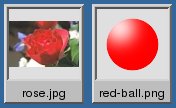
Use the montage program to create a composite image by combining several separate images. The images are tiled on the composite image optionally adorned with a border, frame, image name, and more. See Command Line Processing for advice on how to structure your montage command or see below for example usages of the command.

Example Usage

We list a few examples of the montage command here to illustrate its usefulness and ease of use. To get started, let's montage two images into a single composite:

$ montage -background #336699 -geometry +4+4 rose.jpg red-ball.png montage.jpg
Ok, let's add some decorations:
$ montage -label %f -frame 5 -background #336699 -geometry +4+4 rose.jpg red-ball.png frame.jpg

montage -geometry "1280x480" -tile 2x2 1.jpg 2.jpg 3.jpg 4.jpg montage.jpg 

Source: http://www.tutorialspoint.com/unix_commands/montage.htm 

Monday, June 2, 2014

SCIRun: open source biomedical Meshing, Computing, Modeling, Simulation, Visualization

Modeling   Simulation Meshing  Visualization

SCIRun is a Problem Solving Environment (PSE), for modeling, simulation and visualization of scientific problems.
SCIRun now includes the biomedical components formally released as BioPSE, as well as BioMesh3D.

SCIRun is a problem solving environment or "computational workbench" in which a user selects software modules that can be connected in a visual programing environment to create a high level workflow for experimentation. Each module exposes all the available parameters necessary for scientists to adjust the outcome of their simulation or visualization. The networks in SCIRun are flexible enough to enable duplication of networks and creation of new modules.

Many SCIRun users find this software particularly useful for their bioelectric field research. Their topics of investigation include cardiac electro-mechanical simulation, ECG and EEG forward and inverse calculations, modeling of deep brain stimulation, electromyography calculation, and determination of the electrical conductivity of anisotropic heart tissue. Users have also made use of SCIRun for the visualization of breast tumor brachytherapy, computer aided surgery, teaching, and a number of non-biomedical applications.


scirun
biomesh3d
seg3d
shapeworks
imagevis3d
map3d

cleaver

http://www.sci.utah.edu/cibc-software/scirun.html

Wednesday, May 14, 2014

Wildland-Urban Fire Models: open-source

The Wildland-Urban Interface Fire Dynamics Simulator (WFDS)
an open-source  fire model computational fluid dynamics (CFD) code developed by the National Institute
of Standards and Technology (NIST), US
Link: WFDS, Wildland-Urban Fire Models, http://www.fs.fed.us/pnw/fera/wfds/index.shtml