Yt is an additional python package aiming for Volumetric Data Analysis, An volumetric analysis and visualization toolkit for Astrophysical simulations, handling multi-resolution data from astrophysical simulations, radio telescopes, and a burgeoning interdisciplinary community, etc.
Link: http://yt-project.org/
Showing posts with label Free/ Open-source. Show all posts
Showing posts with label Free/ Open-source. Show all posts
Tuesday, December 2, 2014

Tuesday, November 18, 2014
eLearning @ Cerfacs - Online Courses
CERFACS
members collaborate to formation in multiple places (engineering
schools and universities in Toulouse, Bordeaux and Paris, and
specialized schools for PhDs and engineers such as Von Karmann Institut,
College de Polytechnique, etc) and on many topics (numerical methods,
high-performance computing, fortran, optimization, tutorial for Large
Eddy Simulation of reacting flows, theoretical and numerical combustion,
Computation Fluid Dynamics on massively parallel architectures, etc).
To ensure that students can have the best access to teaching materials (courses, hands-on exercices, links to various external sources, examples of exams),
CERFACS has gathered data on this website where you can download all data related to the course they are following. You are welcome to use this site.
Link: http://elearning.cerfacs.fr/
To ensure that students can have the best access to teaching materials (courses, hands-on exercices, links to various external sources, examples of exams),
CERFACS has gathered data on this website where you can download all data related to the course they are following. You are welcome to use this site.
Link: http://elearning.cerfacs.fr/
Friday, November 14, 2014
Book: Boundary Layer Theory, Schlichting
Schlichting, Boundary Layer Theory
Link: http://ae.sharif.edu/~farshchi/Schlichting,%20H.%20-%20Boundary%20Layer%20Theory%20(Springer).pdf
Link: http://ae.sharif.edu/~farshchi/Schlichting,%20H.%20-%20Boundary%20Layer%20Theory%20(Springer).pdf
Wednesday, November 12, 2014
Free Fire Dynamics Simulator (FDS) and Smokeview
Fire Dynamics Simulator (FDS) is a large-eddy simulation (LES) code for low-speed flows, with an emphasis on smoke and heat transport from fires.
Fire Dynamics Simulator (FDS) is a computational fluid dynamics (CFD) model of fire-driven fluid flow. The software solves numerically a form of the Navier-Stokes equations appropriate for low-speed, thermally-driven flow, with an emphasis on smoke and heat transport from fires.
Smokeview (SMV) is a visualization program used to display the output of FDS and CFAST simulations.
FDS+Evac is the evacuation simulation module for Fire Dynamics Simulator (FDS). The software is used to simulate the movement of people in evacuation situations. The evacuation simulations can be fully coupled with the fire simulations.
These tools are open source and freely available.
Source: https://code.google.com/p/fds-smv/
Fire Dynamics Simulator (FDS) is a computational fluid dynamics (CFD) model of fire-driven fluid flow. The software solves numerically a form of the Navier-Stokes equations appropriate for low-speed, thermally-driven flow, with an emphasis on smoke and heat transport from fires.
Smokeview (SMV) is a visualization program used to display the output of FDS and CFAST simulations.
FDS+Evac is the evacuation simulation module for Fire Dynamics Simulator (FDS). The software is used to simulate the movement of people in evacuation situations. The evacuation simulations can be fully coupled with the fire simulations.
These tools are open source and freely available.
Source: https://code.google.com/p/fds-smv/
Tuesday, November 11, 2014
Django
Django is a free and open source web application framework, written in Python, which follows the model–view–controller architectural pattern. It is maintained by the Django Software Foundation (DSF), an independent organization established as a non-profit.
Django's primary goal is to ease the creation of complex, database-driven websites. Django emphasizes reusability and "pluggability" of components, rapid development, and the principle of don't repeat yourself. Python is used throughout, even for settings, files, and data models. Django also provides an optional administrative create, read, update and delete interface that is generated dynamically through introspection and configured via admin models.
Source: www.djangoproject.com
Source: www.djangoproject.com
Saturday, November 8, 2014
SU2 Compressible Flow Solver - open source
Stanford University Unstructured (SU2)
Computational analysis tools have revolutionized the way we design aerospace systems, but most established codes are proprietary, unavailable, or prohibitively expensive for many users. The SU2 team is changing this, making computational analysis and design freely available as open-source software and involving everyone in its creation and development.
Source: http://su2.stanford.edu/
Computational analysis tools have revolutionized the way we design aerospace systems, but most established codes are proprietary, unavailable, or prohibitively expensive for many users. The SU2 team is changing this, making computational analysis and design freely available as open-source software and involving everyone in its creation and development.
Source: http://su2.stanford.edu/
Thursday, November 6, 2014
iFEM, Finite Element, Matlab
iFEM is a MATLAB software package containing robust, efficient, and easy-following codes for the main building blocks of adaptive finite element methods on unstructured simplicial grids in both two and three dimensions. Besides the simplicity and readability, sparse matrixlization, an innovative programming style for MATLAB, is introduced to improve the efficiency. In this novel coding style, the sparse matrix and its operations are used extensively in the data structure and algorithms.
Source: http://www.math.uci.edu/~chenlong/programming.html
Source: http://www.math.uci.edu/~chenlong/programming.html
Tuesday, November 4, 2014
Book: Robust Control with Matlab
Free Book: Robust Control with Matlab
Source: http://www.mediafire.com/download/vhh3ti3c13z5tgw/RM_BOOK3.pdf
Source: http://www.mediafire.com/download/vhh3ti3c13z5tgw/RM_BOOK3.pdf
Tuesday, October 28, 2014
OpenMDAO - Multidisciplinary Design Analysis and Optimization
OpenMDAO is an open-source (why?) Multidisciplinary Design Analysis and Optimization (MDAO) framework, written in Python. You can use it to develop an integrated analysis and design environment for your engineering challenges.
In layman’s terms: OpenMDAO is a piece of software that links other pieces of software together. It allows you to combine analysis tools (or design codes) from multiple disciplines, at multiple levels of fidelity, and to manage the interaction between them. OpenMDAO is specifically designed to manage the dataflow (the actual data) and the workflow (what code is run when) in conjunction with optimization algorithms and other advanced solution techniques. OpenMDAO also has extensive optimization capabilities built right in.
Link: http://openmdao.org/
In layman’s terms: OpenMDAO is a piece of software that links other pieces of software together. It allows you to combine analysis tools (or design codes) from multiple disciplines, at multiple levels of fidelity, and to manage the interaction between them. OpenMDAO is specifically designed to manage the dataflow (the actual data) and the workflow (what code is run when) in conjunction with optimization algorithms and other advanced solution techniques. OpenMDAO also has extensive optimization capabilities built right in.
Link: http://openmdao.org/
Monday, October 20, 2014
Install PyDev for Eclipse in Linux
Install PyDev for Eclipse in Linux
Eclipse: Help > Install New Software
An error occurred while collecting items to be installed"
How, Troubleshoot:
- Ubuntu 12.04
- Eclipse Version: 3.7.2
Eclipse: Help > Install New Software
Eclipse: Help > Install New Software
- Work with: PyDev - http://pydev.org/updates
- Name> Select PyDev
- Next
- Select "PyDev for Eclipse"
- Next
- I accept terms of the license agreement
- Finish
An error occurred while collecting items to be installed"
How, Troubleshoot:
- Ubuntu 12.04
- Eclipse Version: 3.7.2
Eclipse: Help > Install New Software
- Work with: PyDev - http://pydev.org/updates
- Deselect "Show only the latest versions of available software"
- Name> Put arrow down PyDev
- Select "PyDev for Eclipse, 2.8.2"
- Next
- Select "PyDev for Eclipse"
- Next
- I accept terms of the license agreement
- Finish
Friday, October 17, 2014
matplotlib: free plotting tool in Linux, (python code) similar Matlab
matplotlib
matplotlib is a pure Python 2D plotting library designed to bring publication quality plotting to Python with a syntax familiar to MATLAB users. All of the plotting commands in the pylab interface can be accessed either via a functional interface familiar to MATLAB users or an object oriented interface familiar to Python users.The library uses numpy for handling large data sets and supports a variety of output backends including GTK GTKAgg, GTKCairo, FltkAgg, QtAgg, TkAgg and WXAgg.
Features include:
- Generate:
- Plots
- Histograms
- Power spectra
- Bar charts
- Errorcharts
- Scatterplots and more
- Based on Python, a full-featured modern object-oriented programming language suitable for large-scale software development
- Suitable for fast scripting, including CGI scripts
- Free, open source, no license servers
- Native SVG support
Install in ubuntu/debian:
- sudo apt-get build-dep python-matplotlib
Install in Fedora/Red Hat:
- su -c "yum-builddep python-matplotlib"
- cd python folder
- python setup.py install
Source: http://matplotlib.org/
Error:
1) install matplotlib python version x.x required, which was not found in the registry.
--> Correction: You must install the python version which older or equal to the version of matplotlib.
2) ImportError: No module named matplotlib.pyplot
import six
ImportError: No module named 'six'
--> Download and install this packages: https://pypi.python.org/pypi/six
ImportError: matplotlib requires dateutil
--> Install: python-dateutil
Saturday, October 11, 2014
Can't find boot-repair package in Ubuntu
Solution: sudo add-apt-repository ppa:yannubuntu/boot-repair
sudo sh -c "sed -i 's/trusty/saucy/g' (continue below) /etc/apt/sources.list.d/yannubuntu-boot-repair-trusty.list"
sudo apt-get update
sudo apt-get install -y boot-repair && (boot-repair &) Read more : linkWednesday, August 13, 2014
OpenFOAM for MS windows binary release
This is the OpenFOAM for MS windows binary release project ("openfoam-mswin")
This project is hosted by SourceForge.net. The project team describes it as:
This is the native MS windows release of OpenFOAM, an open source toolbox for Computational Fluid Dynamics (CFD). It was built with MinGW C++ as a set of native windows applications, which improves performance and eliminates the need for Unix emulations.
Source: http://sourceforge.net/projects/openfoam-mswin/
This project is hosted by SourceForge.net. The project team describes it as:
This is the native MS windows release of OpenFOAM, an open source toolbox for Computational Fluid Dynamics (CFD). It was built with MinGW C++ as a set of native windows applications, which improves performance and eliminates the need for Unix emulations.
Source: http://sourceforge.net/projects/openfoam-mswin/
Tuesday, August 12, 2014
Free tools for remoting access client, server, and SFTP / FTP copy/ file transfer
- Tight VNC, http://www.tightvnc.com/
- Real VNC, www.realvnc.com
- Turb VNC, http://turbovnc.software.informer.com/
- Tiger VNC server, http://sourceforge.net/projects/tigervnc/
Copy files/folders remotely
- Free SFTP and FTP client for Windows, http://winscp.net/
- Core FTP, http://www.coreftp.com/
Wednesday, July 30, 2014
TORQUE Resource Manager - Scheduler, PBS job queuing
TORQUE Resource Manager provides control over batch jobs and distributed computing resources. It is an advanced open-source product based on the original PBS project* and incorporates the best of both community and professional development. It incorporates significant advances in the areas of scalability, reliability, and functionality and is currently in use at tens of thousands of leading government, academic, and commercial sites throughout the world. TORQUE may be freely used, modified, and distributed under the constraints of the included license.
TORQUE can integrate with Moab Workload Manager to improve overall utilization, scheduling and administration on a cluster. Customers who purchase Moab family products also receive free support for TORQUE.
Source: http://www.adaptivecomputing.com/products/open-source/torque/
TORQUE can integrate with Moab Workload Manager to improve overall utilization, scheduling and administration on a cluster. Customers who purchase Moab family products also receive free support for TORQUE.
Source: http://www.adaptivecomputing.com/products/open-source/torque/
Thursday, June 12, 2014
Montage: Create a composite image by combining several separate images
Use the
montage program to create a composite image by
combining several separate images. The images are tiled on the
composite image optionally adorned with a border, frame, image name, and
more. See Command Line Processing for advice on how to structure your montage command or see below for example usages of the command.Example Usage
We list a few examples of themontage command here to illustrate its usefulness and ease of use. To get started, let's montage two images into a single composite:
$ montage -background #336699 -geometry +4+4 rose.jpg red-ball.png montage.jpg



$ montage -label %f -frame 5 -background #336699 -geometry +4+4 rose.jpg red-ball.png frame.jpg
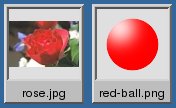
montage -geometry "1280x480" -tile 2x2 1.jpg 2.jpg 3.jpg 4.jpg montage.jpg
Source: http://www.tutorialspoint.com/unix_commands/montage.htm
Monday, June 2, 2014
SCIRun: open source biomedical Meshing, Computing, Modeling, Simulation, Visualization
Modeling Simulation Meshing Visualization
SCIRun is a Problem Solving Environment (PSE), for modeling, simulation and visualization of scientific problems.
SCIRun now includes the biomedical components formally released as BioPSE, as well as BioMesh3D.
SCIRun is a problem solving environment or "computational workbench" in which a user selects software modules that can be connected in a visual programing environment to create a high level workflow for experimentation. Each module exposes all the available parameters necessary for scientists to adjust the outcome of their simulation or visualization. The networks in SCIRun are flexible enough to enable duplication of networks and creation of new modules.
Many SCIRun users find this software particularly useful for their bioelectric field research. Their topics of investigation include cardiac electro-mechanical simulation, ECG and EEG forward and inverse calculations, modeling of deep brain stimulation, electromyography calculation, and determination of the electrical conductivity of anisotropic heart tissue. Users have also made use of SCIRun for the visualization of breast tumor brachytherapy, computer aided surgery, teaching, and a number of non-biomedical applications.


http://www.sci.utah.edu/cibc-software/scirun.html
SCIRun is a Problem Solving Environment (PSE), for modeling, simulation and visualization of scientific problems.
SCIRun now includes the biomedical components formally released as BioPSE, as well as BioMesh3D.
SCIRun is a problem solving environment or "computational workbench" in which a user selects software modules that can be connected in a visual programing environment to create a high level workflow for experimentation. Each module exposes all the available parameters necessary for scientists to adjust the outcome of their simulation or visualization. The networks in SCIRun are flexible enough to enable duplication of networks and creation of new modules.
Many SCIRun users find this software particularly useful for their bioelectric field research. Their topics of investigation include cardiac electro-mechanical simulation, ECG and EEG forward and inverse calculations, modeling of deep brain stimulation, electromyography calculation, and determination of the electrical conductivity of anisotropic heart tissue. Users have also made use of SCIRun for the visualization of breast tumor brachytherapy, computer aided surgery, teaching, and a number of non-biomedical applications.
http://www.sci.utah.edu/cibc-software/scirun.html
Wednesday, May 14, 2014
Wildland-Urban Fire Models: open-source
The Wildland-Urban Interface Fire Dynamics Simulator (WFDS)
an open-source fire model computational fluid dynamics (CFD) code developed by the National Institute
of Standards and Technology (NIST), US
Link: WFDS, Wildland-Urban Fire Models, http://www.fs.fed.us/pnw/fera/wfds/index.shtml
an open-source fire model computational fluid dynamics (CFD) code developed by the National Institute
of Standards and Technology (NIST), US
Link: WFDS, Wildland-Urban Fire Models, http://www.fs.fed.us/pnw/fera/wfds/index.shtml
Friday, May 2, 2014
PyFR, open-source high-order flow solver
PyFR
www.pyfr.org
an open-source high-order flow solver that is designed to efficiently target a range of hardware platforms - including clusters of multi-core CPUs, Nvidia GPUs, Intel Xeon Phi Coprocessors, and AMD GPUs - all from a single Python codebase.
Wednesday, April 16, 2014
Screen Print, Video recorder, Image/ Video Converter in Linux, Ubuntu
Shutter program
mencoder (MPlayer's Movie Encoder)
GTK Record My Desktop
Imagemagick to capture the screen in linux, Ubuntu
How to capture screen in Ubuntu
Install : $ sudo apt-get install imagemagick
Capture whole screen: $ import -window root Image.png
Capture selected window: $ import Image.png
Capture frame: $ import -frame Pictures/Image.png
Capture selected window and resize: $ import -resize 320 -pause 3 Image.png
Convert video format .ogv to avi or mp4
ffmpeg -i my-demo-video.ogv -vcodec mpeg4 -sameq -acodec libmp3lame my-demo-video.avi
ffmpeg -i out.ogv -vcodec libx264 -vpre medium -crf 24 -threads 0 -acodec copy foo.mkv
ffmpeg -i out.ogv -vcodec libx264 -vpre medium -crf 24 -threads 0 -acodec libfaac foo.mp4
Convert many files using shell
#!/bin/bash
# ovg2avi - Covert ovg to avi
# Author: Vivek Gite <www.cyberciti.biz> Under GPL 2.0+
# -------------------------------------------------------
input="$1"
output="${input%%.ogv}.avi}"
die(){
echo -e "$@"
exit 1
}
[ $# -eq 0 ] && die "Usage: $0 input.ovg\n\tI will convert .ovg file to .avi format."
[ ! -f "$input" ] && die "Error $input file not found."
if [ -f "$output" ]
then
read -p "Warning output file $output exists. Overwrite (y/n)? " ans
case $ans in
y|Y|YES|Yes) mencoder "${input}" -ovc lavc -oac mp3lame -o "${output}";;
esac
fi
Covert many file using bash
for o in *.ogv
do
/path/to/ovg2avi "$o"
done
mencoder (MPlayer's Movie Encoder)
GTK Record My Desktop
Imagemagick to capture the screen in linux, Ubuntu
How to capture screen in Ubuntu
Install : $ sudo apt-get install imagemagick
Capture whole screen: $ import -window root Image.png
Capture selected window: $ import Image.png
Capture frame: $ import -frame Pictures/Image.png
Capture selected window and resize: $ import -resize 320 -pause 3 Image.png
Convert video format .ogv to avi or mp4
ffmpeg -i my-demo-video.ogv -vcodec mpeg4 -sameq -acodec libmp3lame my-demo-video.avi
ffmpeg -i out.ogv -vcodec libx264 -vpre medium -crf 24 -threads 0 -acodec copy foo.mkv
ffmpeg -i out.ogv -vcodec libx264 -vpre medium -crf 24 -threads 0 -acodec libfaac foo.mp4
Convert many files using shell
#!/bin/bash
# ovg2avi - Covert ovg to avi
# Author: Vivek Gite <www.cyberciti.biz> Under GPL 2.0+
# -------------------------------------------------------
input="$1"
output="${input%%.ogv}.avi}"
die(){
echo -e "$@"
exit 1
}
[ $# -eq 0 ] && die "Usage: $0 input.ovg\n\tI will convert .ovg file to .avi format."
[ ! -f "$input" ] && die "Error $input file not found."
if [ -f "$output" ]
then
read -p "Warning output file $output exists. Overwrite (y/n)? " ans
case $ans in
y|Y|YES|Yes) mencoder "${input}" -ovc lavc -oac mp3lame -o "${output}";;
esac
fi
Covert many file using bash
for o in *.ogv
do
/path/to/ovg2avi "$o"
done
Subscribe to:
Posts (Atom)